Most OpenClaw users treat their agent like a chatbot: ask a question, get an answer, close the app. The heartbeat is the feature that breaks that pattern. Every 30 minutes by default, OpenClaw wakes up, reads a file called heartbeat.md, and decides whether anything needs your attention. No prompt from you required.
The problem is that the defaults are either too aggressive or too passive for most real workflows. A 30-minute interval checking everything in your heartbeat file burns tokens needlessly when nothing has changed. A vague instruction like “check if anything is new” produces either spam or silence.
We have configured heartbeats for content pipelines, email triage systems, and DevOps monitoring across our own OpenClaw deployments. The difference between a well-tuned heartbeat and the defaults is the difference between a useful assistant and an expensive alarm clock.
This guide covers how the heartbeat works internally, how to write a heartbeat.md that does something useful, how to pick the right interval for your use case, and how to debug the common problems that make people think the feature is broken.
How the Heartbeat Works Internally
Before configuring anything, you need to understand the execution model. The heartbeat is not a background daemon running separately from your agent. It is a scheduled agent turn that runs in the main session, using the same context window as your regular conversations.
Every interval (default: 30 minutes), OpenClaw’s HeartbeatRunner fires. It sends the agent a system prompt: “Read HEARTBEAT.md if it exists. Follow it strictly.” The agent then reads the file, evaluates each instruction, and does one of two things:
- Nothing needs attention – the agent replies with
HEARTBEAT_OK. OpenClaw suppresses this message so you never see it. Your phone stays silent. - Something needs attention – the agent sends you an actual message through your configured channel (Telegram, Slack, etc.).
The suppression logic is specific: HEARTBEAT_OK must appear at the start or end of the reply, and any remaining text must be 300 characters or fewer (configurable via ackMaxChars). If the agent buries HEARTBEAT_OK in the middle of a longer message, it gets delivered as a normal message.
This design means the heartbeat is event-driven at its core. The agent wakes up, checks conditions, and stays quiet unless something matters. The system rewards silence.
Where Heartbeats Run
By default, heartbeats run in the agent’s main session. This means they share the conversation history and context window with your regular chats. That is fine for simple checks, but it has a cost: each heartbeat adds to the context window, and long-running sessions with frequent heartbeats can trigger compaction faster.
Two flags change this behavior:
isolatedSession: trueruns each heartbeat in a fresh session with no conversation history. The agent starts cold every time.lightContext: trueloads onlyheartbeat.mdfrom your bootstrap files, skippingagents.md,soul.md,memory.md, and everything else.
Combining both flags drops per-heartbeat token consumption from roughly 100,000 tokens (full context) to 2,000-5,000 tokens. We use this combination for any heartbeat that only needs to check external conditions (disk space, inbox, API health) and does not need to reference your conversation history or preferences.
Configuring heartbeat.md
The heartbeat.md file lives in your OpenClaw workspace folder alongside agents.md, soul.md, and memory.md. It is a plain markdown file containing instructions the agent follows on every heartbeat cycle.
If the file does not exist, heartbeats still fire but the agent has nothing to check, so it returns HEARTBEAT_OK every time. If the file exists but is empty (whitespace or headers only), OpenClaw skips the heartbeat entirely to save API calls.
Writing Effective Instructions
The best heartbeat files share three qualities: they are specific about what to check, they include criteria for when to alert, and they tell the agent what “normal” looks like so it can stay quiet.
Here is a general-purpose starter configuration:
## Memory Maintenance
Check if today's memory file exists (memory/YYYY-MM-DD.md).
Create it if missing.
Summarize decisions, preferences, and key learnings from active sessions.
Skip routine acknowledgments and small talk.

## Task Tracking
Review active tasks. Mark anything completed as done.
If new tasks were mentioned in today's sessions, add them to the list.
Only notify me if a task is overdue or blocked.

## Cron Health Check
Check whether any scheduled cron jobs failed in the last hour.
If a cron missed its window by more than 15 minutes, re-trigger it.
Log failures to today's memory file.
Only message me if a cron has failed twice consecutively.
Three things to notice. First, every section specifies when to stay quiet (“Only notify me if…”). Without this, the agent defaults to reporting everything, which defeats the purpose. Second, the instructions are imperative and concrete. “Check whether cron jobs failed” is actionable. “Keep an eye on things” is not. Third, the file is short. Every character in heartbeat.md gets loaded on every cycle. A 5,000-word heartbeat file burns tokens 48 times a day.
Use-Case Configurations
Different workflows need different heartbeat files. Here are configurations we have tested for specific scenarios.
Email triage agent:
## Inbox Check
Check for new unread emails since the last heartbeat.
Categorize each email: action-required, FYI, newsletter, spam.
Draft replies for action-required emails and save as Gmail drafts.
Send me a Telegram summary only if there are action-required emails.
For FYI and newsletter, log to today's memory file silently.

## Follow-Up Tracking
Check the follow-up list in memory/follow-ups.json.
If any follow-up is overdue by more than 24 hours, message me.
For the full email management setup, see our OpenClaw email management guide.
Content pipeline monitor:
## Publishing Queue
Check the content calendar in workspace/content-plan.md.
If anything is scheduled for today and not yet published, remind me.
If a draft has been in review for more than 48 hours, flag it.

## Analytics Check (daily only)
If the current time is between 09:00 and 09:30 in my timezone,
fetch yesterday's analytics summary and post it to the Content channel.
Outside that window, skip this section entirely.
DevOps health check:
## Service Status
Run health checks against the endpoints in workspace/services.json.
Only message me if a service returns non-200 or response time exceeds 2 seconds.
For transient errors (single failure), log it but wait for the next heartbeat.
For consecutive failures (2+ heartbeats), alert immediately.

## Disk and Resource Monitoring
Check available disk space on the host machine.
Alert if any partition drops below 10% free space.
Log current usage to today's memory file.
Choosing the Right Interval
The default 30-minute interval works for general-purpose monitoring, but it is wrong for plenty of scenarios. Too frequent wastes tokens on redundant checks. Too infrequent misses time-sensitive events.
Here is the decision framework we use:
| Use Case | Recommended Interval | Reasoning |
|---|---|---|
| Email triage | 15-30 minutes | Emails arrive throughout the day; 15 min catches most things within a reasonable window |
| Memory maintenance | 30-60 minutes | Conversations do not change state rapidly enough to justify more frequent saves |
| DevOps monitoring | 10-15 minutes | Downtime costs money; faster detection justifies the token spend |
| Content pipeline | 60 minutes | Publishing schedules rarely change within 30 minutes |
| Personal assistant (general) | 30 minutes | Good default; adjust after observing actual alert frequency |
| Overnight / low activity | 60-120 minutes or disable | Nothing happening; save your tokens |
Setting the Interval
The interval is controlled by the every property in your OpenClaw configuration. You can set it globally or per agent:
Global default (all agents):
{
  "agents": {
    "defaults": {
      "heartbeat": {
        "every": "30m"
      }
    }
  }
}
Per-agent override:
{
  "agents": {
    "list": [
      {
        "name": "devops-monitor",
        "heartbeat": {
          "every": "10m"
        }
      }
    ]
  }
}
The every property accepts duration strings: 10m, 30m, 1h, 2h. Set it to 0m to disable heartbeats entirely for a specific agent.
One thing the docs do not emphasize: if you use Anthropic OAuth as your authentication method, the default interval is 60 minutes, not 30. This is a rate-limiting precaution. If you need faster heartbeats with Anthropic, set the interval explicitly.
Active Hours: Quiet Windows
Nobody wants their agent messaging them at 3 AM to report that the inbox is empty. The activeHours configuration restricts heartbeats to specific time windows:
{
  "agents": {
    "defaults": {
      "heartbeat": {
        "every": "30m",
        "activeHours": {
          "start": "08:00",
          "end": "22:00",
          "timezone": "America/New_York"
        }
      }
    }
  }
}
Heartbeats skip entirely outside the configured window and resume at the next scheduled tick inside it. If you omit the timezone, OpenClaw uses your configured user timezone or the host system’s timezone.
You can also handle quiet windows inside heartbeat.md itself for more granular control:
## Quiet Hours Rule
Between 23:00 and 08:00 in my timezone, only message me for
genuine emergencies: service outages, security alerts, or
failed critical crons. Everything else waits until morning.
This approach gives you per-section control that the JSON configuration cannot match.
Token Cost Management
Every heartbeat runs a full agent turn. That means model inference, context loading, and potentially tool calls. The cost is real, and it accumulates.
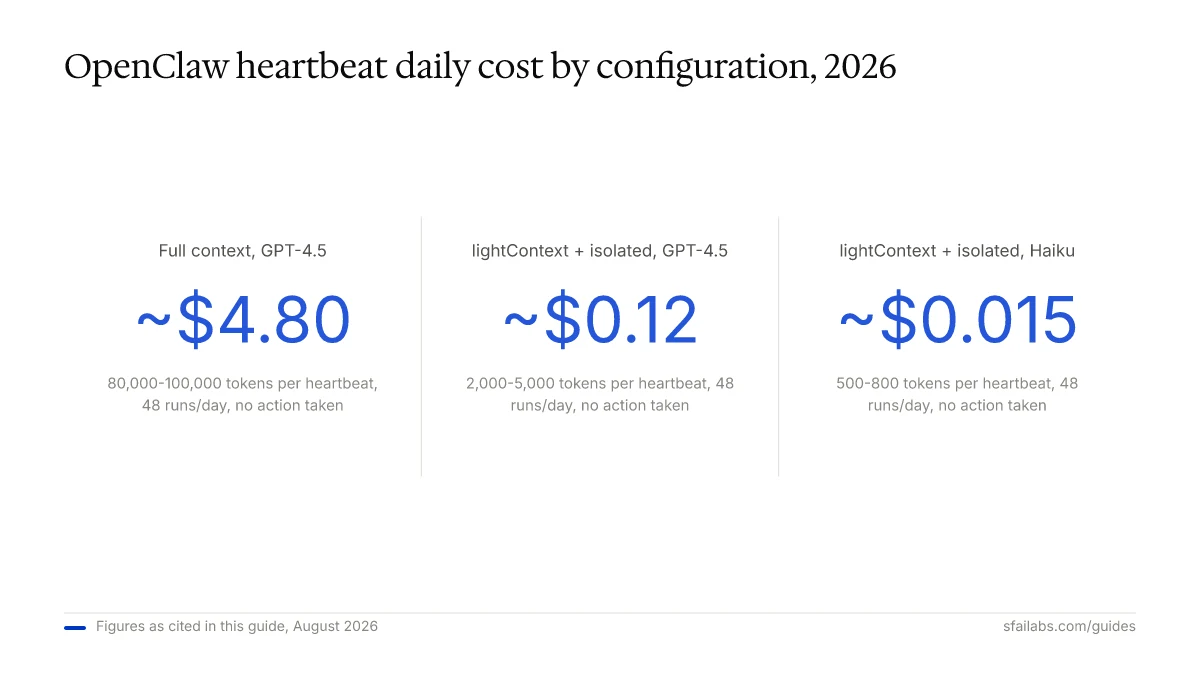
Here are rough token costs per heartbeat cycle, based on the model and configuration:
| Configuration | Tokens Per Run | Daily Cost (48 runs) | Model |
|---|---|---|---|
| Full context, no action | 80,000-100,000 | ~$4.80 | GPT-4.5 |
| Full context, with checks | 100,000-120,000 | ~$6.00 | GPT-4.5 |
| lightContext + isolated, no action | 2,000-5,000 | ~$0.12 | GPT-4.5 |
| lightContext + isolated, with checks | 5,000-15,000 | ~$0.36 | GPT-4.5 |
| lightContext + isolated, no action | 500-800 | ~$0.015 | Claude Haiku |
The difference between full context and the optimized configuration is roughly 40x in token consumption. For heartbeats that check external conditions without needing conversation context, there is no reason not to use lightContext: true and isolatedSession: true.
Using a Cheaper Model for Heartbeats
You can override the model used for heartbeat runs without changing your primary agent model:
{
  "agents": {
    "defaults": {
      "heartbeat": {
        "every": "30m",
        "model": "anthropic/claude-haiku"
      }
    }
  }
}
This is the single most effective cost optimization. A heartbeat that checks three conditions and returns HEARTBEAT_OK does not need GPT-4.5 or Claude Opus. Haiku or GPT-4o-mini handle it fine at a fraction of the cost. Reserve the expensive model for your actual conversations.
Heartbeat vs. Cron: When to Use Each
OpenClaw has two scheduling mechanisms, and confusing them is a common mistake.
Heartbeat is a periodic check-in. The agent wakes up, evaluates conditions, and decides whether to act. It runs in the main session (unless isolated), shares context with your conversations, and is designed for monitoring and reactive alerting.
Cron is a scheduled task. It fires at a precise time, runs a specific action, and operates in a detached session. It is designed for tasks that must happen at exact times regardless of conditions.
| Heartbeat | Cron | |
|---|---|---|
| Timing | Every N minutes (flexible) | Exact time (e.g., “9:00 AM Monday”) |
| Session | Main session (default) or isolated | Always isolated |
| Context | Can access conversation history | Detached; no conversation context |
| Purpose | “Check if anything needs doing” | “Do this specific thing at this time” |
| Cost | Runs whether needed or not | Runs only at scheduled time |
Use heartbeat for: inbox monitoring, memory maintenance, health checks, task tracking.
Use cron for: daily briefings, weekly reports, scheduled publishing, recurring API calls at fixed times.
The two complement each other. Your heartbeat can even monitor cron health, re-triggering jobs that missed their window, as shown in the heartbeat.md examples earlier.
Debugging Heartbeat Problems
Three issues account for most heartbeat frustrations.
Problem 1: Heartbeats Fire Too Often
A known bug (fixed in recent versions but worth checking if you are on an older release) caused heartbeats to fire every 1-2 minutes regardless of the configured interval. The root cause was a missing interval check when events other than the timer triggered heartbeat evaluation. Cron completions, tool call results, and other internal events would bypass the interval gate and fire the heartbeat immediately.
Fix: Update to the latest OpenClaw version. If you cannot update, check your HeartbeatRunner logs for the frequency of HEARTBEAT_OK responses. If they appear more often than your configured interval, this is the bug.
Run openclaw daemon status to verify your current version and heartbeat state.
Problem 2: Heartbeats Never Fire
Check these in order:
- Is
heartbeat.mdempty? An empty file (whitespace or headers only) causes OpenClaw to skip execution entirely. Add at least one instruction. - Is the interval set to
0m? This disables heartbeats. - Is
activeHoursmisconfigured? Equalstartandendvalues create a zero-width window that always skips. Check your timezone setting. - Is the daemon running? Run
openclaw daemon statusin your terminal.
Problem 3: Agent Messages on Every Heartbeat
Your heartbeat.md is missing silence criteria. Every instruction should specify when the agent should stay quiet. Without explicit “only message me if…” conditions, the agent defaults to reporting on every check. Go through each section of your heartbeat file and add a condition that defines “normal” (no notification needed).
Frequently Asked Questions
How do I change the OpenClaw heartbeat interval?
Set agents.defaults.heartbeat.every in your OpenClaw configuration to a duration string like "15m", "1h", or "2h". For per-agent intervals, use agents.list[].heartbeat.every. The default is 30 minutes (60 minutes for Anthropic OAuth users).
What does HEARTBEAT_OK mean?
HEARTBEAT_OK is the response your agent sends when nothing needs your attention. OpenClaw automatically suppresses this message so it never reaches your phone. The suppression works when HEARTBEAT_OK appears at the start or end of the reply and any remaining text is 300 characters or fewer.
Does the heartbeat cost money?
Yes. Every heartbeat runs a full model inference turn. With default settings and GPT-4.5, 48 daily heartbeats can cost $4-6/day. Using lightContext: true, isolatedSession: true, and a cheaper model like Claude Haiku drops this to under $0.02/day. Token optimization is not optional for sustainable heartbeat usage.
What is the difference between heartbeat and cron?
Heartbeat is a periodic check-in where the agent evaluates conditions and decides whether to act. Cron is a fixed-schedule task that runs a specific action at an exact time. Use heartbeat for monitoring (inbox, health checks, memory). Use cron for scheduled actions (daily briefings, weekly reports). See the comparison table above.
Can I use a different model just for heartbeats?
Yes. Set agents.defaults.heartbeat.model to a cheaper model like "anthropic/claude-haiku" or "openai/gpt-4o-mini". Your regular conversations continue using your primary model. This is the most effective way to reduce heartbeat costs.
How do I stop my agent from messaging me at night?
Configure activeHours in your heartbeat settings with a start and end time and your timezone. Or add a “Quiet Hours Rule” section to your heartbeat.md that tells the agent to suppress non-emergency notifications during specific hours. The heartbeat.md approach gives you finer control over what counts as an emergency.
How do I know if my heartbeat is actually running?
Check your daily memory files in the memory/ folder. If your heartbeat includes memory maintenance instructions, each file should have timestamped entries from heartbeat cycles. You can also run openclaw daemon status in your terminal to see heartbeat state. If memory files stop appearing or lag by hours, your heartbeat may have stopped.
Why is my heartbeat firing more often than configured?
Older OpenClaw versions had a bug where events like cron completions bypassed the interval check, causing heartbeats to fire every 1-2 minutes. Update to the latest version. If you are already current, verify your every setting and check that you do not have per-agent overrides with shorter intervals.
Key Takeaways
- The heartbeat turns OpenClaw from a reactive chatbot into a proactive agent. It wakes up every N minutes, reads
heartbeat.md, and stays silent unless something needs your attention. - Always include silence criteria in your heartbeat instructions. Without them, your agent reports on every cycle and the feature becomes noise.
- Use
lightContext: trueandisolatedSession: truefor heartbeats that do not need conversation history. This cuts token consumption by roughly 40x. - Override the heartbeat model to a cheaper option like Claude Haiku. Checking conditions does not require your best model.
- Start with one or two checks in your heartbeat file and add more as you learn what your agent actually catches. A bloated heartbeat file burns tokens and rarely improves results.
Related Resources
- How to Set Up OpenClaw the Right Way: 10 Steps – covers heartbeat basics in Step 8
- OpenClaw Memory Configuration: Make Your Agent Remember Everything – deep dive on the memory system that heartbeat maintains
- How to Use OpenClaw for Email Management – full email triage setup including heartbeat-based inbox checks
- OpenClaw official heartbeat docs – reference documentation for all configuration properties
SFAI Labs


