Pointing OpenClaw at Anthropic’s Claude 4.6 family takes about ten minutes if you know the right config keys, and about three hours if you debug through stale model IDs, auth profile quirks, and a cache configuration that silently no-ops. This guide walks through the full path: Anthropic API key setup in .env, choosing between Opus 4.6, Sonnet 4.6, and Haiku 4.5 for each OpenClaw workload, enabling prompt caching, and projecting monthly spend.
If you haven’t installed OpenClaw yet, start with our installation guide and come back once openclaw gateway status reports healthy. You will also need an Anthropic account and an API key — our Anthropic API key walkthrough covers the console steps.
The Claude 4.6 Family in OpenClaw
OpenClaw speaks to Anthropic through the anthropic/ provider prefix. Three Claude models are relevant for agent workloads in 2026:
| Model | Provider String | Context | Best For |
|---|---|---|---|
| Claude Opus 4.6 | anthropic/claude-opus-4-6 |
200K | Hard reasoning, long debugging sessions, large-codebase refactors |
| Claude Sonnet 4.6 | anthropic/claude-sonnet-4-6 |
200K | Default agent primary — strongest cost-to-capability ratio |
| Claude Haiku 4.5 | anthropic/claude-haiku-4-5 |
200K | Heartbeats, tool-output summarization, high-volume sub-agents |
All three share a 200K-token context window and support tool use, vision, and prompt caching. The difference is cost, speed, and ceiling on reasoning depth. Opus 4.6 is roughly 5x the per-token cost of Sonnet 4.6 and about 2x slower at p50. Haiku 4.5 is roughly 4x cheaper than Sonnet and responds in under a second for short prompts.
Do not use model IDs from older Claude generations in your OpenClaw config. OpenClaw will accept the string and attempt the call, then fail silently into the fallback chain when Anthropic returns a deprecation or not-found error. Typo the ID and you get the same result — a working-looking agent that is silently running on your backup provider.
Setting the Anthropic API Key
Create your key in the Anthropic console and copy it immediately — the console only shows the full key once.
Store the key as an environment variable. Never paste it into openclaw.json5:
# ~/.config/openclaw/.env
ANTHROPIC_API_KEY="sk-ant-api03-..."
OpenClaw auto-loads the .env file from its config directory at startup. Verify the key is being read:
openclaw auth status anthropicA healthy response lists the auth profile, the last successful request, and the current rate-limit tier. If it reports “no credentials,” either the .env path is wrong or your shell stripped the variable — run openclaw gateway restart after any .env change.
For multi-environment setups, keep separate keys per environment and load them from your secrets manager at boot. OpenClaw supports multiple auth profiles per provider, so you can rotate keys without downtime:
openclaw auth add anthropic --profile prod
openclaw auth add anthropic --profile staging
When a profile hits a rate limit, OpenClaw rotates to the next profile on the same provider before falling back to a different model.
Selecting Your Primary Claude Model
Set Sonnet 4.6 as your primary unless you have a specific reason to pick Opus or Haiku. It handles tool use, multi-step planning, and long-running agent loops with the best reliability per dollar we have measured across our OpenClaw deployments.
Via CLI:
openclaw models set anthropic/claude-sonnet-4-6Or in openclaw.json5:
{
  agents: {
    defaults: {
      model: {
        primary: "anthropic/claude-sonnet-4-6"
      }
    }
  }
}
Confirm the change:
openclaw models statusThis returns the active primary, fallback chain, auth profile, and any cooldowns. Restart the gateway if the command still shows your old model — OpenClaw caches the model registry per-session.
Switch models mid-session without editing the config:
/model anthropic/claude-opus-4-6This is the right tool for a hard task in an otherwise routine session — step up to Opus for a gnarly refactor, then drop back to Sonnet.
Matching Claude Tiers to OpenClaw Workloads
A single model across every OpenClaw job wastes money. A heartbeat every 30 minutes does not need Opus-level reasoning. A planning session for a cross-repo refactor does not work reliably on Haiku. Route each workload to the right tier.
| OpenClaw Workload | Recommended Model | Why |
|---|---|---|
| Primary agent (default) | Sonnet 4.6 | Best cost-to-capability ratio for tool use and planning |
| Deep reasoning, large refactors | Opus 4.6 | Stronger multi-step logic and code comprehension |
| Heartbeats and health checks | Haiku 4.5 | Fast, cheap, sufficient for status summaries |
| Tool-output summarization sub-agent | Haiku 4.5 | Handles bounded structured text at a fraction of the cost |
| Vision tasks (screenshots, PDFs) | Sonnet 4.6 | Strongest vision quality in the 4.6 family |
| Code review sub-agent | Sonnet 4.6 | Reliable diff reasoning without Opus pricing |
| Privacy-sensitive prompts | Run locally via Ollama | Claude API traffic leaves your network |
Configure dedicated models per role in openclaw.json5:
{
  agents: {
    defaults: {
      model: {
        primary: "anthropic/claude-sonnet-4-6",
        fallbacks: ["anthropic/claude-opus-4-6"]
      },
      heartbeatModel: {
        primary: "anthropic/claude-haiku-4-5"
      },
      subagentModel: {
        primary: "anthropic/claude-haiku-4-5",
        fallbacks: ["anthropic/claude-sonnet-4-6"]
      }
    }
  }
}
The full fallback story — routing across Claude, GPT, and Gemini — is in our multi-model configuration guide. This guide sticks to an all-Anthropic chain.
Enabling Prompt Caching
Prompt caching is the single biggest lever for cutting Claude costs inside OpenClaw. OpenClaw system prompts, tool schemas, and long project contexts are reused across every turn in a session. Without caching you pay full input price on every token, every turn. With caching you pay full price once, then roughly 10% of that on every subsequent read.
The math: cache writes cost 1.25x the base input rate, cache reads cost 0.1x. For a 20K-token system prompt on Sonnet 4.6, one cold write costs about $0.075, and every subsequent read costs about $0.006. Across a ten-turn session you save roughly 85% on system-prompt tokens.
Turn it on in openclaw.json5:
{
  agents: {
    defaults: {
      model: {
        primary: "anthropic/claude-sonnet-4-6"
      },
      providers: {
        anthropic: {
          promptCaching: {
            enabled: true,
            cacheSystemPrompt: true,
            cacheToolDefinitions: true,
            ttl: "5m"
          }
        }
      }
    }
  }
}
The 5-minute TTL fits most interactive sessions. For long-running workflows with gaps between turns, switch to the 1-hour TTL — it costs 2x more on write but saves cache-miss penalties across quiet periods:
ttl: "1h"Two gotchas we hit in production:
- Cache breakpoints are position-sensitive. Changes to the cached prefix invalidate the entire cache. Keep the cached block immutable within a session — move dynamic content (user messages, tool results) after the cached portion.
- Cache hit reporting is silent by default. Enable gateway debug logging to confirm you are getting hits:
openclaw gateway logs --level=debug | grep cache_read_input_tokens. Ifcache_read_input_tokensstays at zero across turns, the cache is not landing.
More on prompt strategy is in our OpenClaw prompt engineering guide.
Cost and Latency Trade-Offs
Current Anthropic pricing for the Claude 4.6 family, per million tokens:
| Model | Input | Output | Cache Write | Cache Read | p50 Latency |
|---|---|---|---|---|---|
| Claude Opus 4.6 | $15 | $75 | $18.75 | $1.50 | ~3.5s |
| Claude Sonnet 4.6 | $3 | $15 | $3.75 | $0.30 | ~1.8s |
| Claude Haiku 4.5 | $0.80 | $4 | $1.00 | $0.08 | ~0.7s |
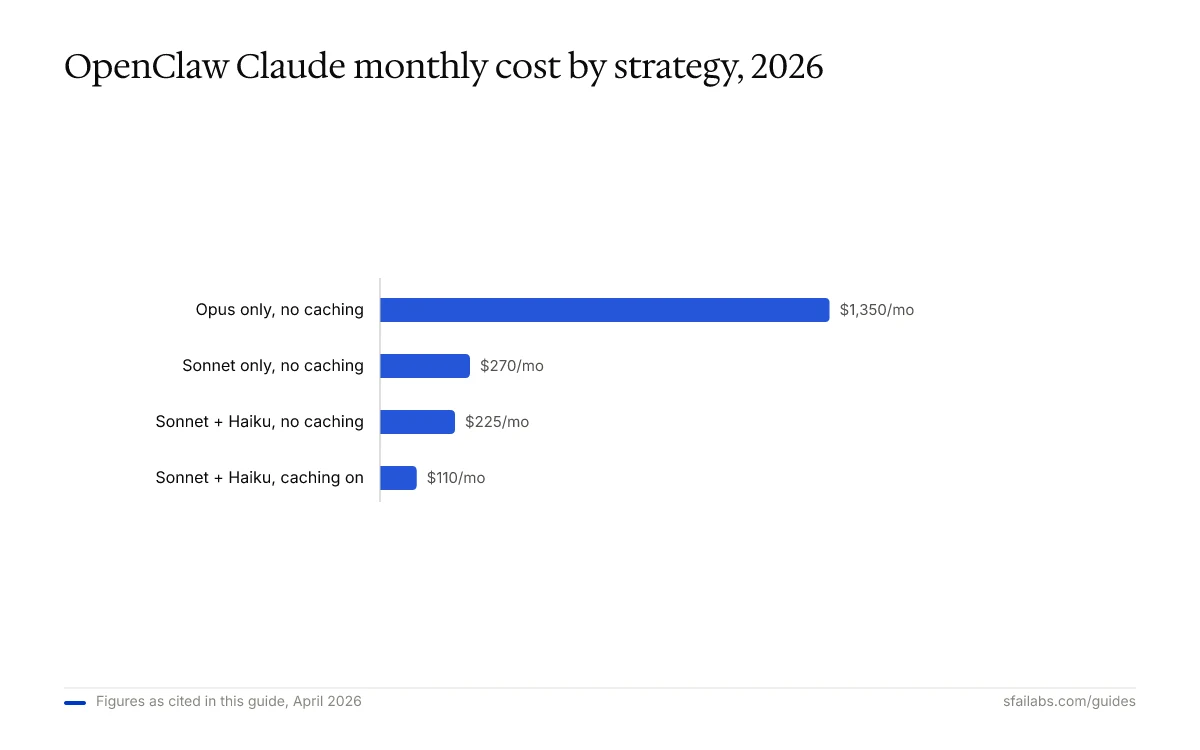
Monthly cost projections for a moderately active OpenClaw agent (roughly 2M input tokens/day, 500K output tokens/day, 70% cache hit rate on a 20K-token system prompt):
| Strategy | Monthly Cost (approx) |
|---|---|
| Opus 4.6 only, no caching | $1,350 |
| Sonnet 4.6 only, no caching | $270 |
| Sonnet 4.6 primary + Haiku 4.5 heartbeats, no caching | $225 |
| Sonnet 4.6 primary + Haiku 4.5 heartbeats, caching on | $110 |
The combined effect of tier routing and caching cuts spend by about 92% compared to running Opus for everything. The full breakdown, including per-request math, lives in our API costs guide.
Latency matters too. A Haiku 4.5 heartbeat returns in under a second; the same check on Opus takes three or four seconds and blocks the gateway loop. For real-time agent UX, cached Sonnet 4.6 reads land in roughly 1.2s — fast enough that users do not notice the model call.
OAuth vs API Key Profiles
OpenClaw supports two auth modes for Anthropic: API key (via ANTHROPIC_API_KEY) and OAuth (device flow). Pick API keys for production and OAuth for local development.
API keys give you:
- Deterministic rate-limit tiers tied to your billing plan
- Stable programmatic auth that survives restarts without user interaction
- Per-key usage tracking in the Anthropic console
OAuth gives you:
- No secret sitting in
.envon developer machines - Per-user quotas if you use Anthropic’s team accounts
- Tokens that expire and need refresh — fine for a laptop, a liability in a container
Add an OAuth profile:
openclaw auth add anthropic --oauthOpenClaw opens a browser, completes the device flow, and stores the refresh token in its encrypted profile store. On token expiry, it attempts a silent refresh; if that fails, the gateway logs an auth error and falls back to the next profile or model.
In every production OpenClaw deployment we run, we use API keys exclusively. OAuth token expiry in a headless container is a pager event waiting to happen.
Common Failure Modes
Three failure modes account for roughly 80% of “Claude is not working in OpenClaw” tickets we see.
1. Model ID Typo Silently Falls Back
Mis-type claude-sonnet-4-6 as claude-sonnet-46 (missing hyphen) and OpenClaw accepts the string. The first request to Anthropic fails with a 404, OpenClaw logs it, and the fallback chain takes over. Your agent looks healthy and is silently running on GPT-5.4 or whatever is next in your chain.
Fix: Validate model IDs against the provider registry:
openclaw models registry anthropicThis lists the exact valid IDs. Copy-paste, do not retype.
2. Cache Breakpoint Invalidated Every Turn
OpenClaw inserts the user message before the system prompt cache breakpoint in some older configs. The cache writes on every turn and never reads, so you pay 1.25x input cost every request instead of 0.1x.
Fix: Upgrade to OpenClaw 2026.3 or later, which emits the correct breakpoint order automatically. On older versions, pin the system prompt with the explicit cache_control hint in openclaw.json5:
providers: {
  anthropic: {
    promptCaching: {
      enabled: true,
      explicitBreakpoints: true
    }
  }
}
3. Rate Limits Cascade Into Cold Starts
Hit your Anthropic rate limit and OpenClaw rotates to the next auth profile. If you only have one profile, it falls back to the next model — which means a cold cache. The next 20K-token system prompt is a full write at 1.25x cost, not a 0.1x read.
Fix: Configure at least two Anthropic auth profiles. Rate-limit bursts typically exceed one profile but rarely two:
openclaw auth add anthropic --profile primary
openclaw auth add anthropic --profile burst
OpenClaw rotates profiles within the same provider before dropping to the fallback chain, which preserves cache validity.
Complete Production Configuration
A full openclaw.json5 for an all-Anthropic OpenClaw deployment with tier routing and caching:
{
  agents: {
    defaults: {
      model: {
        // Sonnet 4.6 as the workhorse
        primary: "anthropic/claude-sonnet-4-6",
        // Opus 4.6 only when Sonnet fails or a task demands it
        fallbacks: ["anthropic/claude-opus-4-6"]
      },
      // Haiku 4.5 for 30-minute health checks
      heartbeatModel: {
        primary: "anthropic/claude-haiku-4-5"
      },
      // Sub-agents default to Haiku for cost control
      subagentModel: {
        primary: "anthropic/claude-haiku-4-5",
        fallbacks: ["anthropic/claude-sonnet-4-6"]
      },
      providers: {
        anthropic: {
          promptCaching: {
            enabled: true,
            cacheSystemPrompt: true,
            cacheToolDefinitions: true,
            ttl: "5m"
          }
        }
      },
      // Explicit allowlist — avoids silent session switch rejections
      models: {
        "anthropic/claude-opus-4-6": { alias: "Opus" },
        "anthropic/claude-sonnet-4-6": { alias: "Sonnet" },
        "anthropic/claude-haiku-4-5": { alias: "Haiku" }
      }
    }
  }
}
Restart and verify:
openclaw gateway restart
openclaw models status
openclaw auth status anthropic
You should see Sonnet as primary, Opus as the lone fallback, Haiku wired to heartbeats and sub-agents, and caching reported as enabled. Tail the gateway log for one session and confirm cache_read_input_tokens climbs on turn two and beyond.
Frequently Asked Questions
How do I connect OpenClaw to Claude?
Set ANTHROPIC_API_KEY in your OpenClaw .env file, then run openclaw models set anthropic/claude-sonnet-4-6. Restart the gateway with openclaw gateway restart and verify with openclaw models status. The gateway will now route all agent requests to Claude Sonnet 4.6 unless you configure a different primary.
Which Claude 4.6 model should I use as my OpenClaw primary?
Claude Sonnet 4.6. It handles tool use, multi-step planning, and agent workflows at roughly one-fifth the cost of Opus 4.6 with reliability that covers most production workloads. Reserve Opus 4.6 for deep reasoning tasks where you can absorb the 5x cost premium, and use Haiku 4.5 for heartbeats and high-volume sub-agents.
How do I configure the ANTHROPIC_API_KEY for OpenClaw?
Add ANTHROPIC_API_KEY="sk-ant-api03-..." to ~/.config/openclaw/.env, then restart the gateway. Never paste the key into openclaw.json5 — OpenClaw reads credentials from environment variables only. Confirm the key is loaded with openclaw auth status anthropic, which reports the active profile and rate-limit tier.
Does OpenClaw support Claude prompt caching?
Yes. Enable it under providers.anthropic.promptCaching in openclaw.json5. The default 5-minute TTL works for interactive sessions; switch to 1-hour for long-running workflows. Cache writes cost 1.25x base input rate and cache reads cost 0.1x, which translates to roughly 85% savings on repeated system prompts across a session.
When should I use Opus 4.6 vs Sonnet 4.6 vs Haiku 4.5?
Sonnet 4.6 is the default primary. Step up to Opus 4.6 for long-horizon reasoning, large-codebase refactors, and debugging sessions that need multi-hop inference. Step down to Haiku 4.5 for heartbeats, tool-output summarization, and any high-volume sub-agent work where latency matters more than reasoning depth.
How much does running OpenClaw on Claude cost per month?
A moderately active agent (2M input tokens/day, 500K output tokens/day) costs roughly $270/month on Sonnet 4.6 alone, drops to about $225 with Haiku 4.5 heartbeats, and falls to roughly $110 with prompt caching enabled. Running everything on Opus 4.6 with no caching costs around $1,350. See our API costs guide for detailed math.
Can I use Claude via OAuth in OpenClaw?
Yes, with openclaw auth add anthropic --oauth. OAuth tokens expire and need refresh, which is fine for local development but fragile in headless containers. For production deployments, use API keys and configure at least two auth profiles so OpenClaw can rotate profiles when one hits a rate limit before falling back to a different model.
How do I debug “model not available” errors on Claude?
Three checks. First, validate the model ID against openclaw models registry anthropic — typos silently fall back. Second, run openclaw auth status anthropic to confirm the key is loaded and not expired. Third, tail openclaw gateway logs --level=debug for the failing request and look for the Anthropic error code; 404 means wrong model ID, 401 means bad key, 429 means rate limit.
Key Takeaways
- Use Claude Sonnet 4.6 as your OpenClaw primary, Opus 4.6 as a fallback, and Haiku 4.5 for heartbeats and sub-agents
- Store
ANTHROPIC_API_KEYin.env, never inopenclaw.json5, and run at least two auth profiles in production - Enable prompt caching in
openclaw.json5to cut per-session costs by roughly 85% on repeated system prompts - Validate model IDs against
openclaw models registry anthropicto avoid silent fallbacks from typos - Combined tier routing and caching brings a moderately active Claude-on-OpenClaw deployment to roughly $110/month, down from $1,350 on Opus-only
SFAI Labs


