Mistral AI runs some of the most cost-effective language models available, and getting API access takes about five minutes through their developer console. Unlike OpenAI or Anthropic, Mistral offers a free Experiment plan that lets you test models without entering payment information. This guide covers the full setup process, walks through the current model lineup and pricing, and shows how to connect your key to tools like Openclaw for multi-model workflows.
One thing that catches developers off guard: Mistral requires you to activate billing before your API key will work, even on the free Experiment plan. You do not need to add a credit card for the Experiment tier, but you must explicitly select a plan in the billing section. Skipping this step is the most common reason new keys return authentication errors.
Step 1: Create Your Mistral Account
Go to console.mistral.ai and create an account. You can sign up with email or through OAuth providers including Google, GitHub, Microsoft, and Apple.
On your first login, Mistral asks you to create a workspace. Give it a name, specify whether it is for personal use or a team, and accept the terms of service.
Mistral may also require phone number verification via SMS during plan selection. Have your phone nearby.
Step 2: Set Up Billing
Navigate to the Administration section in the left sidebar and find Billing. Mistral offers two plans:
- Experiment (free): No payment method required. Designed for prototyping and testing. Rate limits are lower, but sufficient for development work.
- Scale (pay-as-you-go): Requires a credit card. Higher rate limits and access to all models. You pay only for what you use.
Select a plan before generating your API key. Even on the free Experiment plan, you must complete this step. If you skip billing setup, your API key will be created but API calls will fail with a 401 error.
For personal projects and prototyping, start with Experiment. Upgrade to Scale when you need production-level throughput or access to premier models like Mistral Medium 3.1.
Step 3: Generate Your API Key
Go to the API Keys page under your workspace. Click Create new key.
Mistral asks for two optional fields:
- Name/label: A tag to identify what the key is for (e.g., “dev-project” or “openclaw-integration”). Useful when you have multiple keys.
- Expiration date: When the key should automatically stop working. We recommend setting an expiration and rotating keys periodically.
Click Create. Your key appears in a confirmation modal.
Copy it immediately. Mistral shows the full key exactly once. After you close this modal, you cannot retrieve it. If you lose the key, you will need to generate a new one.
Store the key in a password manager or your project’s .env file. Do not paste it into source code that gets committed to version control.
Step 4: Set Your Key as an Environment Variable
The Mistral SDKs look for the MISTRAL_API_KEY environment variable by default.
macOS / Linux (Zsh or Bash):
export MISTRAL_API_KEY="your-key-here"Add this line to your ~/.zshrc or ~/.bashrc to persist it across terminal sessions.
Windows:
Open System Settings, search for “Environment Variables,” create a new user variable named MISTRAL_API_KEY, and paste your key as the value.
Step 5: Verify Your Key Works
Run this curl command to confirm your key is active:
curl https://api.mistral.ai/v1/chat/completions \
  -H "Content-Type: application/json" \
  -H "Authorization: Bearer $MISTRAL_API_KEY" \
  -d '{
    "model": "mistral-small-latest",
    "messages": [{"role": "user", "content": "Say hello"}]
  }'
If you get a JSON response with generated text, the key works.
A difference from Google Gemini: Mistral uses standard Bearer token authentication in the Authorization header, the same pattern as OpenAI and Anthropic. If you are coming from the Gemini API (which passes the key as a URL query parameter), switch to the header approach.
If the call fails, check three things: billing is activated (even on the free plan), the key has not expired, and you are using the correct authorization header format.
Mistral Models and What They Cost
Mistral offers a wide range of models, from budget options for high-volume tasks to frontier models for complex reasoning. Here is the current lineup as of April 2026:
| Model | Input Cost | Output Cost | Context | Best For |
|---|---|---|---|---|
| Ministral 3B | Budget pricing | Budget pricing | 128K | Edge deployment, simple tasks |
| Ministral 8B | $0.10 / 1M tokens | $0.10 / 1M tokens | 128K | High-volume processing |
| Mistral Small 4 | $0.20 / 1M tokens | $0.60 / 1M tokens | 128K | General-purpose, open-weight |
| Devstral 2 | $0.50 / 1M tokens | $1.50 / 1M tokens | 256K | Code generation, software agents |
| Mistral Medium 3.1 | ~$1.00 / 1M tokens | ~$3.00 / 1M tokens | 128K | Frontier multimodal (Premier) |
| Mistral Large 3 | $2.00 / 1M tokens | $6.00 / 1M tokens | 128K | Complex reasoning, multimodal |
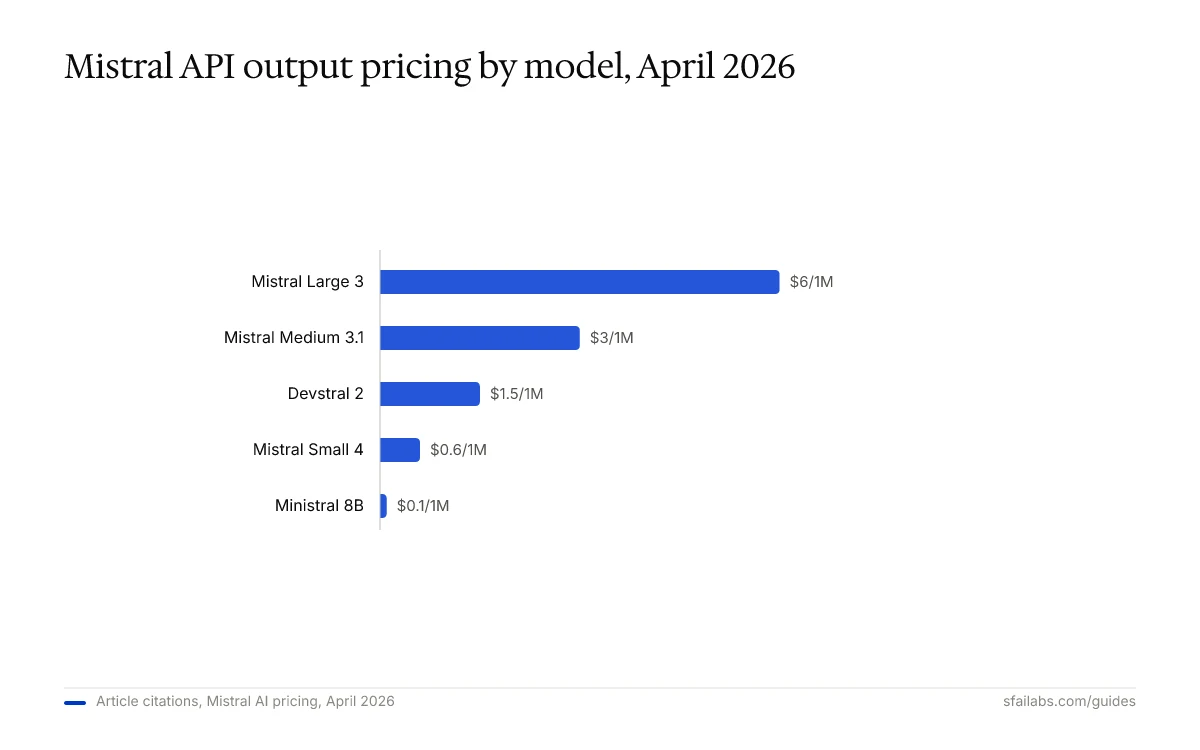
Mistral’s pricing undercuts most competitors at every tier. Ministral 8B at $0.10 per million input tokens is cheaper than GPT-5.4’s smallest model. Mistral Small 4 at $0.20 competes directly with Gemini 2.5 Flash ($0.30) while being open-weight, meaning you can also self-host it if you want to eliminate API costs entirely.
For most developers starting out, Mistral Small 4 is the right default. It handles general-purpose tasks well, the pricing is forgiving, and the 128K context window covers most use cases. Move to Mistral Large 3 when you need stronger reasoning, or Devstral 2 when you are building coding agents.
Specialist Models Worth Knowing
Beyond the generalist lineup, Mistral has carved out specialist models that competitors lack:
- Codestral: Purpose-built for code completion and generation. If you are building a coding assistant or IDE plugin, this outperforms general-purpose models on code benchmarks.
- Voxtral: Text-to-speech and audio transcription. Mistral is one of the few API providers offering speech models alongside language models under a single key.
- Magistral: Reasoning-optimized variants of Medium and Small. Think of these as Mistral’s answer to OpenAI’s o-series reasoning models.
What to Do With Your Key Next
If you are a developer, install the official SDK. For Python:
pip install mistralaiFor Node.js:
npm install @mistralai/mistralaiMistral also provides SDKs for Go, Java, and other languages. The full list is at docs.mistral.ai.
If you want an AI agent that runs autonomously, connect your key to Openclaw. Openclaw is a personal AI agent that operates through Telegram or WhatsApp and supports multiple model providers. Your Mistral key works alongside OpenAI, Anthropic, and Google keys in a multi-model fallback configuration. If one provider hits rate limits or goes down, Openclaw routes to the next available model automatically.
This is where Mistral’s pricing advantage pays off in practice. In a multi-provider setup, routing simple tasks to Ministral 8B ($0.10 per million tokens) and reserving GPT-5.4 or Claude Opus 4.6 for complex reasoning cuts costs significantly. If 80% of your requests are simple enough for Ministral 8B, you are paying $0.10 instead of $2.00+ per million tokens on those calls.
We have guides for the full setup:
- How to Set Up Openclaw: 10-Step Guide covers workspace configuration, memory, and model selection
- Deploy Openclaw on Hostinger VPS for 24/7 uptime
- How to Get Your OpenAI API Key and How to Get Your Anthropic API Key for additional providers
- How to Get Your Google Gemini API Key for the fourth major provider
Keeping Your Key Secure
Mistral API keys do not have built-in spending caps by default. If your key leaks, anyone can run API calls on your account until you revoke it.
Three practices that prevent problems:
-
Never commit your key to version control. Add
.envto your.gitignorefile. GitGuardian specifically detects Mistral AI API keys in public repositories, which tells you how often this happens. -
Set an expiration date on every key. Mistral lets you configure this at creation time. A 90-day rotation cycle is a reasonable default. When the key expires, generate a fresh one and update your environment variables. This limits the window of exposure if a key leaks undetected.
-
Use separate keys for separate projects. If you have a personal project and a production deployment, create distinct keys with descriptive labels. If one gets compromised, you revoke that single key without disrupting everything else.
Frequently Asked Questions
Is the Mistral API free to use?
Mistral offers a free Experiment plan that does not require a credit card. You can generate API keys and make calls to most models at reduced rate limits. For production workloads or higher throughput, the Scale plan charges per token with no monthly minimum. Generating the API key itself is always free regardless of plan.
What is the difference between Experiment and Scale plans?
Experiment is Mistral’s free tier for prototyping. It gives you access to most models with lower rate limits and no billing requirement. Scale is the pay-as-you-go production plan with higher rate limits, access to all models including premier offerings like Mistral Medium 3.1, and requires a credit card on file. You can upgrade from Experiment to Scale at any time without regenerating your API keys.
Which Mistral model should I start with?
Mistral Small 4 is the best default for most use cases. It is open-weight, costs $0.20 per million input tokens, and handles general-purpose tasks including summarization, Q&A, and content generation. For code-heavy work, use Devstral 2 or Codestral. For tasks requiring frontier-level reasoning, step up to Mistral Large 3.
Why is my Mistral API key returning errors?
The most common cause is not activating billing. Even on the free Experiment plan, you must select a plan in the billing section before API calls will work. Other causes: the key has passed its expiration date, you are hitting rate limits (check response headers for 429 status codes), or the Authorization header format is wrong. Mistral uses Authorization: Bearer YOUR_KEY, not URL parameter authentication.
Can I use my Mistral key with tools like Openclaw or LangChain?
Any tool that supports the Mistral API or the OpenAI-compatible chat completions format can use your key. Openclaw, LangChain, LlamaIndex, and most AI agent frameworks support Mistral natively. Set MISTRAL_API_KEY in your environment and point the tool to https://api.mistral.ai/v1/ as the base URL.
How does Mistral pricing compare to OpenAI and Anthropic?
Mistral is the cheapest option at the budget tier. Ministral 8B at $0.10 per million tokens undercuts everything from OpenAI and Anthropic. At the frontier tier, Mistral Large 3 at $2.00 input / $6.00 output sits below Claude Opus 4.6 and GPT-5.4 on price while delivering competitive performance. The open-weight nature of most Mistral models also means you can self-host to eliminate per-token costs entirely if you have the infrastructure.
Key Takeaways
- Create your account at console.mistral.ai and activate billing (even on the free plan) before generating your API key.
- Mistral shows the key exactly once. Copy it immediately and store it in a
.envfile or password manager. - Start with Mistral Small 4 ($0.20/1M input tokens) for general tasks. Use Devstral 2 for coding and Mistral Large 3 for complex reasoning.
- Mistral uses Bearer token authentication in the
Authorizationheader, the same pattern as OpenAI and Anthropic. - Connect your key to Openclaw to use Mistral alongside other providers in a multi-model fallback system that optimizes both cost and reliability.
SFAI Labs


