Your HuggingFace API token is what unlocks access to over 800,000 models on the Hub, from open-weight LLMs like Llama 4 Scout to specialized vision and audio models. The token itself takes about two minutes to create. The part most tutorials skip is understanding which token type you need, how gated models work, and what the free tier actually gives you. This guide covers all of it.
Step 1: Create Your HuggingFace Account
Go to huggingface.co and click Sign Up. You can register with email, Google, or GitHub.
After signing up, HuggingFace sends a verification email. You must confirm your email address before the platform lets you create access tokens. This catches people off guard because the settings page shows the token UI even before verification, but the “New token” button stays grayed out until your email is confirmed.
Once verified, you land on your profile. The rest happens in Settings.
Step 2: Generate Your Access Token
Navigate to huggingface.co/settings/tokens. Click New token.
HuggingFace asks for two things: a name and a token type. Name it something descriptive (like “Openclaw Agent” or “Local Dev”) so you can tell your tokens apart later. If you are running multiple projects, one token per project makes revocation painless.
Click Generate a token. Your token appears on screen, starting with hf_.
Copy it immediately. HuggingFace displays the full token exactly once. Close this dialog and the token is masked permanently. If you lose it, you need to create a new one. Store it in a password manager, a .env file, or your platform’s secrets vault.
Step 3: Choose the Right Token Type
This is where HuggingFace differs from most API providers. You get three token types, not just one:
Read tokens give you access to download models and datasets you are authorized to see, including private repos within your organizations. Use this for inference, running models locally, and any read-only workflow. If you are just consuming models, this is what you want.
Write tokens add the ability to push models, create repositories, and modify model cards. Use this if you are training models, uploading fine-tuned weights, or contributing to a shared org repo.
Fine-grained tokens let you scope permissions to specific repositories or organizations. This is the option most tutorials gloss over, but it is the one you should use in production.
Here is a practical way to think about it:
| Scenario | Token Type | Why |
|---|---|---|
| Running inference locally | Read | You only need to download model weights |
| Pushing a fine-tuned model | Write | You need upload access to a repo |
| Production API server | Fine-grained (read, scoped to one model) | Limits blast radius if the token leaks |
| CI/CD pipeline | Fine-grained (write, scoped to target repo) | Prevents the pipeline from touching other repos |
| Quick prototyping | Read | Simplest option for experiments |
In projects we have built for clients, the most common mistake is using a personal write token in production. If that token leaks, someone can push to every repo you have access to. A fine-grained token scoped to a single model limits the damage to that one repository.
Step 4: Verify Your Token Works
Open a terminal and run this quick check:
curl -H "Authorization: Bearer hf_YOUR_TOKEN_HERE" \
  https://huggingface.co/api/whoami-v2
If the token is valid, you get a JSON response with your username, email, and organizations. If you see 401 Unauthorized, double-check that you copied the token correctly and that your email is verified.
For Python users, the huggingface_hub library has a built-in login flow:
from huggingface_hub import login
login(token="hf_YOUR_TOKEN_HERE")
Or from the command line:
huggingface-cli loginThis saves the token to ~/.cache/huggingface/token so you do not have to pass it to every function call. The HF_TOKEN environment variable also works if you prefer environment-based auth.
Accessing Gated Models Like Llama
Some of the most popular models on HuggingFace are gated, meaning you need to request access before your token can download them. Llama 4 Scout from Meta, Gemma from Google, and several Mistral models all require this extra step.
The process works like this:
- Go to the model page (e.g., meta-llama/Llama-4-Scout)
- Click the Expand to review and access section
- Fill out the form with your name and intended use
- Submit and wait for approval
Most gated models on HuggingFace use automatic approval, so access is granted within seconds. A few (typically early research releases) use manual review, which can take hours or days.
Once approved, your existing read or fine-grained token works for downloading. You do not need to create a new token. The access grant is tied to your account, and any token with read permissions inherits it.
The most common error people hit: they request access on the model page, get approved, but then try to download using a fine-grained token that was not scoped to that model. Either scope the fine-grained token to include the gated model, or use a standard read token.
Free Tier vs Pro: What Your Token Unlocks
Having a token does not mean unlimited usage of the Inference API. HuggingFace gives every account free monthly credits, but the amounts are small:
| Account Type | Monthly Credits | Cost |
|---|---|---|
| Free | $0.10 | $0/month |
| Pro | $2.00 | $9/month |
| Enterprise | $2.00 per seat | Custom pricing |
That $0.10 in free credits is enough for a few dozen inference calls, depending on the model. Enough to test a workflow, not enough to run anything in production.
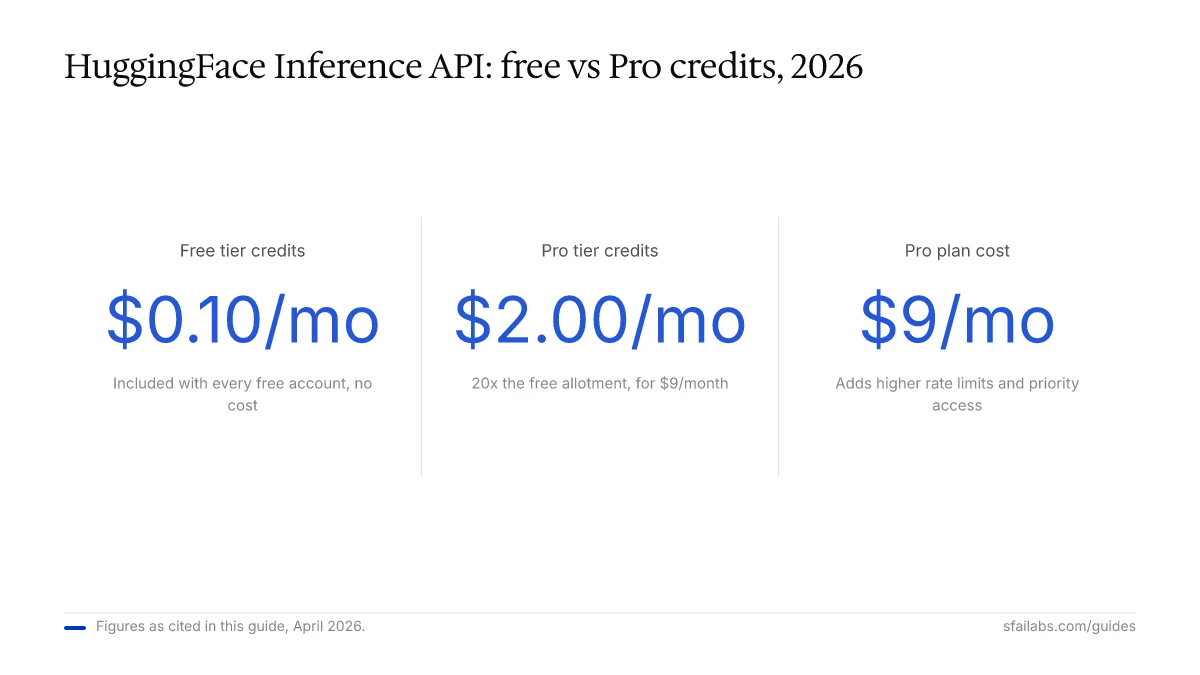
The Pro plan at $9/month bumps your credits to $2/month and adds higher rate limits plus priority access to popular models. If you are running experiments regularly or using the Inference API for demos, Pro pays for itself quickly.
Past your included credits, billing switches to pay-as-you-go. HuggingFace charges based on compute time multiplied by hardware cost, and they pass through provider rates with no markup. You can track spending at huggingface.co/settings/billing.
One thing that confuses people: running models locally with transformers or diffusers does not cost anything through HuggingFace. The token is only required for authentication (downloading gated or private models). Inference API credits only apply when you send requests through HuggingFace’s hosted endpoints.
Connecting Your Token to Openclaw
If you want to use HuggingFace models through an AI agent rather than writing API calls by hand, connect your token to Openclaw. Openclaw is a personal AI agent that runs locally and handles tasks autonomously through Telegram or WhatsApp.
Add your HuggingFace token to Openclaw’s environment configuration:
HF_TOKEN=hf_YOUR_TOKEN_HEREWith this set up, Openclaw can pull models from the Hub and route inference through HuggingFace’s API. This is particularly useful if you want to run open-weight models as an alternative to OpenAI or Anthropic.
Related setup guides:
- How to Set Up Openclaw: 10-Step Guide for the full installation walkthrough
- How to Get Your OpenAI API Key if you also need an OpenAI key
- How to Get Your Anthropic API Key for Claude access
- How to Get Your Google Gemini API Key for Gemini access
Keeping Your Token Secure
Three rules that prevent most token-related incidents:
-
Never commit tokens to version control. Add
.envto your.gitignore. If you accidentally push a token to GitHub, revoke it immediately at huggingface.co/settings/tokens and generate a new one. HuggingFace tokens that appear in public repos get flagged by services like GitGuardian. -
Use environment variables in production, not hardcoded strings. The
HF_TOKENenvironment variable is supported natively bytransformers,diffusers, andhuggingface_hub. In containerized deployments, inject the token as a secret, not a build argument. -
Use fine-grained tokens for production. A fine-grained token scoped to a single model in read-only mode is far less dangerous than a write token with access to your entire account. The extra 30 seconds of setup is worth it.
Frequently Asked Questions
Is HuggingFace free to use?
Creating an account, generating tokens, and downloading public models costs nothing. The Inference API gives free accounts $0.10/month in credits. Running models locally using transformers is free beyond your own compute costs. The paid Pro plan ($9/month) adds $2/month in API credits and higher rate limits.
What is the difference between read, write, and fine-grained tokens?
Read tokens let you download models and datasets. Write tokens add upload and repository management. Fine-grained tokens let you restrict permissions to specific repos or organizations. For most developers who just want to run models, a read token is sufficient.
How do I access gated models like Llama on HuggingFace?
Go to the model’s page on HuggingFace, click the access request section, fill out the form, and submit. Most gated models grant access automatically within seconds. After approval, any token with read permissions can download the model. No special token type is needed.
Can I use HuggingFace models without an API token?
For public, non-gated models, you can browse model cards and documentation without a token. But downloading model weights, using the Inference API, and accessing private or gated models all require authentication. You can create a free token in under two minutes.
How do I use my HuggingFace token in Python?
Install huggingface_hub with pip install huggingface_hub, then run huggingface-cli login and paste your token. After that, libraries like transformers pick up the token automatically. You can also pass it directly: AutoModel.from_pretrained("model-name", token="hf_...").
What are the rate limits on HuggingFace’s free tier?
Free accounts get $0.10/month in Inference API credits and lower request-per-minute limits. HuggingFace does not publish exact rate limit numbers, but free users report hitting limits after a few hundred requests per hour. The Pro plan at $9/month significantly raises these caps.
How do I revoke or rotate a HuggingFace token?
Go to huggingface.co/settings/tokens, find the token you want to remove, and click Manage then Delete. Generate a fresh token to replace it. Any system using the old token will immediately lose access, so update your environment variables before deleting.
Can I use my HuggingFace token with Openclaw?
Set the HF_TOKEN environment variable in your Openclaw configuration file. Openclaw uses it to authenticate with HuggingFace’s API for model downloads and inference calls. See the Openclaw setup guide for the full walkthrough.
Key Takeaways
- Create your token at huggingface.co/settings/tokens. Verify your email first or the button stays grayed out.
- Use read tokens for inference and downloads, write tokens for uploading, and fine-grained tokens for production where you want to limit the blast radius.
- Gated models like Llama 4 Scout require a separate access request on the model page. Approval is usually automatic.
- Free accounts get $0.10/month in Inference API credits. Pro ($9/month) bumps this to $2/month with higher rate limits.
- Connect your token to Openclaw to use HuggingFace models through an autonomous AI agent instead of raw API calls.
SFAI Labs


