
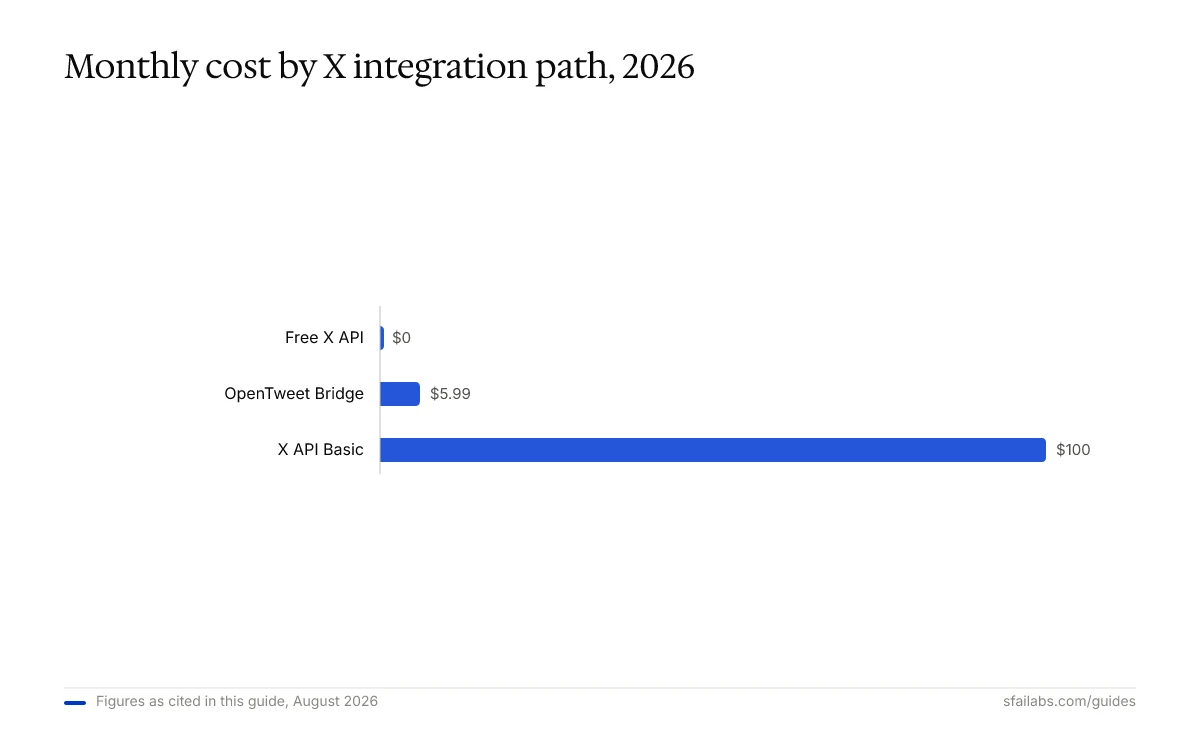
Twitter’s API pricing is the first thing you need to understand before connecting OpenClaw to X. The Free tier gives you 1,500 tweet reads and 50 tweet writes per month. That is enough for light mention monitoring and a handful of scheduled posts, but not much else. The Basic tier at $100/month unlocks 10,000 reads and 3,000 writes, which is where automated social media management becomes practical.
This guide covers two paths: connecting OpenClaw directly to the X API v2 (more control, requires a developer account) and using OpenTweet as a bridge service ($5.99/month, no OAuth setup). We walk through both approaches, write the SKILL.md file from scratch, and set up real workflows for posting, mention monitoring, engagement tracking, and trending topic alerts.
Two Approaches to the X Integration
Before writing any code, pick your integration path. Each has trade-offs worth understanding.
Direct X API v2 gives you full control over authentication, rate limits, and every endpoint Twitter offers. You manage your own API keys, handle OAuth 2.0 flows, and pay Twitter directly. This is the right path if you need read operations (monitoring mentions, searching tweets, tracking engagement) or want to avoid third-party dependencies.
OpenTweet bridge abstracts the OAuth complexity into a simpler REST API. Your X credentials stay on OpenTweet’s servers, and your OpenClaw agent only sees an OpenTweet API key. At $5.99/month, it is cheaper than Twitter’s Basic tier for write-only use cases. The trade-off: you cannot read tweets, search, or monitor mentions through OpenTweet. It only supports posting, scheduling, and threading.
| Feature | Direct X API (Free) | Direct X API (Basic) | OpenTweet Bridge |
|---|---|---|---|
| Monthly cost | $0 | $100 | $5.99 |
| Tweet writes | 50/month | 3,000/month | 1,000/day |
| Tweet reads | 1,500/month | 10,000/month | Not supported |
| Mention monitoring | Yes (limited) | Yes | No |
| Search tweets | No | Yes | No |
| Threading | Yes | Yes | Yes |
| OAuth complexity | High | High | None |
If your primary use case is scheduled posting and threads, OpenTweet is the faster and cheaper path. If you need mention monitoring, engagement tracking, or search capabilities, go with the direct API.
Before You Start
Three things need to be in place:
-
OpenClaw installed and running on your machine or a VPS. If you have not done this yet, follow our OpenClaw setup guide. For 24/7 availability, see the Hostinger VPS deployment guide.
-
An X/Twitter account with the content you want to automate. Business accounts and creator accounts both work.
-
A decision on your integration path from the comparison above. The rest of this guide covers both, clearly labeled.
Path A: Direct X API v2 Setup
This path connects OpenClaw directly to Twitter’s API. You handle authentication and pay Twitter for your API tier.
Create Your X Developer Account
- Go to developer.x.com and sign in with your X account
- Apply for a developer account if you do not already have one. Approval typically takes 1-3 business days for the Free tier
- Once approved, navigate to the Developer Portal Dashboard
- Click Create Project, name it
OpenClaw Agent, and select “Making a bot” as the use case - Inside your project, click Create App and name it
openclaw-twitter
Choose Your API Tier
X offers three API tiers. The Free tier is genuinely useful for testing, but its quotas run out fast in production.
| Tier | Monthly Cost | Tweet Reads | Tweet Writes | Search | Best For |
|---|---|---|---|---|---|
| Free | $0 | 1,500 | 50 | No | Testing and light monitoring |
| Basic | $100 | 10,000 | 3,000 | Yes (10K) | Active posting + monitoring |
| Pro | $5,000 | 1,000,000 | 300,000 | Yes (Full) | Enterprise automation |
We recommend starting on the Free tier to test your integration, then upgrading to Basic only when you hit the 50-write or 1,500-read limit in practice. Most solo creators and small marketing teams find that Basic covers their needs.
Generate Your API Keys
Inside your app settings in the Developer Portal:
- Navigate to Keys and Tokens
- Generate and save these four credentials:
| Credential | What It Does |
|---|---|
| API Key | Identifies your app |
| API Key Secret | Authenticates your app |
| Access Token | Grants access to your X account |
| Access Token Secret | Authenticates actions on your behalf |
- Also generate a Bearer Token for read-only operations (search, user lookup)
Copy all five values immediately. X only shows them once. If you lose one, you must regenerate it.
Store Your Credentials
Create a .env file outside your OpenClaw workspace:
# ~/.env or ~/openclaw/.env
X_API_KEY=your_api_key_here
X_API_SECRET=your_api_secret_here
X_ACCESS_TOKEN=your_access_token_here
X_ACCESS_TOKEN_SECRET=your_access_token_secret_here
X_BEARER_TOKEN=your_bearer_token_here
Never paste these directly into your skill file or any workspace file your agent reads into context. Environment variables keep secrets out of logs and memory files.
Write the OpenClaw Twitter Skill (Direct API)
Create the skill directory and file:
mkdir -p ~/.openclaw/workspace/skills/twitterCreate ~/.openclaw/workspace/skills/twitter/SKILL.md:
---
name: twitter
description: Read and write Twitter/X posts. Monitor mentions, search tweets, post threads, and track engagement via the X API v2.
tools:
  - shell
---

# Twitter/X Skill

## Authentication

Use environment variables for all API requests:
- Bearer token for read operations: $X_BEARER_TOKEN
- OAuth 1.0a for write operations: requires all four keys

Base URL: https://api.x.com/2

## Available Operations

### Post a Tweet

curl -s -X POST "https://api.x.com/2/tweets" \
  -H "Authorization: OAuth oauth_consumer_key=\"$X_API_KEY\", oauth_token=\"$X_ACCESS_TOKEN\", oauth_signature_method=\"HMAC-SHA256\", oauth_timestamp=\"$(date +%s)\", oauth_nonce=\"$(openssl rand -hex 16)\", oauth_version=\"1.0\", oauth_signature=\"COMPUTED\"" \
  -H "Content-Type: application/json" \
  -d '{"text": "TWEET_TEXT_HERE"}'

Note: For simplified posting, use the twitter-api-v2 Node.js library instead of raw curl OAuth. Install it with: npm install twitter-api-v2

### Post Using Node.js (Recommended)

Create a helper script at ~/.openclaw/workspace/skills/twitter/post.js:

const { TwitterApi } = require('twitter-api-v2');
const client = new TwitterApi({
  appKey: process.env.X_API_KEY,
  appSecret: process.env.X_API_SECRET,
  accessToken: process.env.X_ACCESS_TOKEN,
  accessSecret: process.env.X_ACCESS_TOKEN_SECRET,
});

async function postTweet(text) {
  const { data } = await client.v2.tweet(text);
  return data;
}

### Search Recent Tweets

curl -s -H "Authorization: Bearer $X_BEARER_TOKEN" \
  "https://api.x.com/2/tweets/search/recent?query=SEARCH_QUERY&max_results=10&tweet.fields=created_at,public_metrics,author_id"

### Get My Mentions

curl -s -H "Authorization: Bearer $X_BEARER_TOKEN" \
  "https://api.x.com/2/users/MY_USER_ID/mentions?max_results=10&tweet.fields=created_at,public_metrics,author_id"

### Post a Thread

Post the first tweet, then reply to it with each subsequent tweet using the reply parameter:

curl -s -X POST "https://api.x.com/2/tweets" \
  -H "Content-Type: application/json" \
  -d '{"text": "TWEET_TEXT", "reply": {"in_reply_to_tweet_id": "PREVIOUS_TWEET_ID"}}'

### Get Tweet Engagement Metrics

curl -s -H "Authorization: Bearer $X_BEARER_TOKEN" \
  "https://api.x.com/2/tweets/TWEET_ID?tweet.fields=public_metrics"

Returns: retweet_count, reply_count, like_count, quote_count, impression_count

## Rules

- Always confirm tweet content with the user before posting. Show the full text and ask for approval.
- Rate limits: Free tier allows 50 writes/month and 1,500 reads/month. Basic tier allows 3,000 writes and 10,000 reads. Track usage and warn when approaching limits.
- Tweets must be 280 characters or fewer. If the user's message exceeds this, suggest splitting into a thread.
- Never log API keys or tokens in responses or memory files.
- Wait 1-2 seconds between consecutive API calls to avoid triggering rate limits.
- For search queries, URL-encode special characters in the query parameter.
- When posting threads, wait for each tweet's response before posting the next to get the correct reply ID.
Path B: OpenTweet Bridge Setup
If you only need to post tweets, schedule content, and create threads, the OpenTweet bridge is simpler and cheaper than the direct X API.
Create Your OpenTweet Account
- Go to opentweet.io and create an account (7-day free trial, no credit card required)
- Connect your X account via OAuth through the OpenTweet dashboard
- Navigate to Settings > API and generate an API key
- Copy the key (format:
ot_xxxxxxxxxxxx)
Install the OpenTweet Skill
If ClawHub is available:
clawhub install opentweet-x-posterOr create the skill manually. Create ~/.openclaw/workspace/skills/opentweet/SKILL.md:
---
name: opentweet
description: Post tweets, schedule content, and create threads on X via the OpenTweet API bridge. Write-only operations.
tools:
  - shell
---

# OpenTweet X Posting Skill

## Authentication

Use the environment variable OPENTWEET_API_KEY for all requests.
Base URL: https://api.opentweet.io/v1

Headers:
Authorization: Bearer $OPENTWEET_API_KEY
Content-Type: application/json

## Available Operations

### Post a Tweet Immediately

curl -s -X POST "https://api.opentweet.io/v1/posts" \
  -H "Authorization: Bearer $OPENTWEET_API_KEY" \
  -H "Content-Type: application/json" \
  -d '{"text": "TWEET_TEXT_HERE"}'

### Schedule a Tweet

curl -s -X POST "https://api.opentweet.io/v1/posts" \
  -H "Authorization: Bearer $OPENTWEET_API_KEY" \
  -H "Content-Type: application/json" \
  -d '{"text": "TWEET_TEXT_HERE", "scheduled_at": "2026-04-15T14:00:00Z"}'

### Post a Thread

curl -s -X POST "https://api.opentweet.io/v1/threads" \
  -H "Authorization: Bearer $OPENTWEET_API_KEY" \
  -H "Content-Type: application/json" \
  -d '{"tweets": [{"text": "First tweet"}, {"text": "Second tweet"}, {"text": "Third tweet"}]}'

### Check Post Status

curl -s -H "Authorization: Bearer $OPENTWEET_API_KEY" \
  "https://api.opentweet.io/v1/posts/POST_ID"

## Rules

- Always confirm tweet content with the user before posting.
- OpenTweet rate limit: 60 requests/minute, 1,000/day.
- Tweets must be 280 characters or fewer.
- This skill only supports writing (posting, scheduling, threading). For reading tweets, mentions, or search, use the direct X API skill instead.
- Never log the API key in responses or memory files.
Store the API key:
# ~/.env or ~/openclaw/.env
OPENTWEET_API_KEY=ot_xxxxxxxxxxxx
Testing Your Connection
Restart OpenClaw to load the new skill:
openclaw gateway restartOpen your chat interface (Telegram, WhatsApp, or another connected channel) and test with these queries:
For Path A (Direct API):
Post test:
“Post a tweet that says: Testing my OpenClaw Twitter integration”
Your agent should show you the tweet text and ask for confirmation before posting.
Read test:
“Show me my last 5 mentions on Twitter”
The agent should call the mentions endpoint and return recent tweets that mention your account.
For Path B (OpenTweet):
Post test:
“Post a tweet: Testing OpenClaw with OpenTweet”
Schedule test:
“Schedule a tweet for tomorrow at 9am: Good morning from my AI agent”
If any test fails, check these common issues:
| Symptom | Likely Cause | Fix |
|---|---|---|
| 401 Unauthorized | Invalid or expired token | Regenerate keys in Developer Portal or OpenTweet dashboard |
| 403 Forbidden | App lacks Write permission | Enable Read + Write in your app’s settings |
| 429 Too Many Requests | Rate limit exceeded | Wait 15 minutes, then retry |
| Empty mentions | User ID is wrong | Verify your user ID at api.x.com/2/users/me |
| Tweet not appearing | Free tier write limit reached | Check your monthly usage in the Developer Portal |
What to Automate After Setup
The connection itself takes 15-20 minutes. The value comes from what you build on top of it. Here is a practical progression that avoids the mistake of automating everything at once.
Week 1: Scheduled Posting Only
Use your agent to draft and schedule tweets for the week in a single conversation:
“Write 5 tweets about AI agent productivity tips. Schedule them for Monday through Friday at 10am.”
The agent drafts the tweets, shows them to you for approval, and schedules each one. This builds your comfort with the agent’s writing style and catches any formatting issues early.
Week 2: Add Mention Monitoring (Path A Only)
Set up a daily mention check in your OpenClaw heartbeat file. Add this to heartbeat.md:
## Twitter Mention Check
Search for tweets mentioning my handle in the last 24 hours.
For each mention, summarize: who tweeted, what they said, and how many likes it got.
Send me the summary in Telegram.
If any mention has more than 50 likes, flag it as high-priority.
This replaces the habit of checking Twitter manually for replies and mentions. Your agent delivers a daily briefing instead.
Week 3: Engagement Tracking
Add a weekly engagement report:
## Weekly Twitter Engagement (runs every Sunday at 6pm)
Pull metrics for all tweets I posted this week.
Calculate: total impressions, total likes, total retweets, average engagement rate.
Compare to last week's numbers if available.
Send me a summary with the top 3 performing tweets and any patterns you notice.
Week 4: Trending Topic Alerts
For Basic tier users with search access:
## Trending Topic Monitor (runs every 4 hours)
Search Twitter for tweets about [your industry keywords] posted in the last 4 hours.
If any tweet has more than 500 likes or 100 retweets, alert me with the tweet text and a suggested reply.
Keep a running log of trending conversations in memory.
This progression means your agent earns trust gradually. You start with write operations you review before they go live, then add read operations that inform your decisions, and only then move to monitoring that runs autonomously.
Security Considerations
Twitter access is public-facing. A misfire from your agent is visible to your followers and potentially the entire platform. Treat this integration with more caution than internal tools like CRM or project management.
Confirmation before posting. The most important rule in your SKILL.md. Your agent should never post without showing you the exact text and getting approval. If you skip this rule for scheduling, limit it to pre-approved templates.
Least-access scoping. If you only need read access (monitoring, research), use only the Bearer Token and do not generate OAuth write credentials. You cannot accidentally post if the write keys do not exist.
Token storage. Keep all credentials in .env files outside your workspace. Never store them in agents.md, soul.md, or any file your agent loads into context. For more on secure configuration, see our OpenClaw skills development guide.
Rate limit awareness. Build rate tracking into your skill’s Rules section. The Free tier’s 50-write monthly limit can be exhausted in a single aggressive scheduling session. Your agent should track usage and warn you before hitting limits.
Content review for automated posts. If you set up heartbeat-driven posting (no human approval), restrict the agent to pre-approved topics and content templates. Open-ended “write whatever seems relevant” instructions are how agents produce embarrassing public tweets.
Frequently Asked Questions
Do I need a paid X API plan to connect OpenClaw?
Not for basic use. The Free tier ($0/month) gives you 1,500 tweet reads and 50 tweet writes per month. That covers light mention monitoring and a handful of manual posts per week. For active posting (daily scheduled tweets, threads, campaign management), the Basic tier at $100/month is the practical minimum. Alternatively, the OpenTweet bridge at $5.99/month handles posting and scheduling without an X API subscription.
Can OpenClaw read my Twitter timeline and mentions?
Only through the direct X API (Path A), not through OpenTweet. The Free API tier supports mention lookup with the Bearer Token. Search functionality requires the Basic tier or higher. Timeline home feeds are not available on Free or Basic tiers.
How do I stop my agent from posting something wrong?
Add a confirmation rule to your SKILL.md: “Always show the full tweet text and ask for approval before posting.” This is the default in both skill examples above. For scheduled posts, review the queue before approving the batch. If you use heartbeat-driven posting, restrict the agent to pre-approved templates rather than open-ended generation.
Can OpenClaw post threads on X?
Both integration paths support threads. With the direct API, your agent posts the first tweet, captures the tweet ID, then posts each reply using the in_reply_to_tweet_id parameter. OpenTweet handles threads natively with a single API call that accepts an array of tweet texts.
What happens if I hit the rate limit?
The X API returns a 429 status code with a x-rate-limit-reset header telling you when the limit resets (typically 15-minute windows for per-request limits, monthly for quota limits). Add a rule to your SKILL.md: “If you receive a 429 response, report the reset time and do not retry until then.” The OpenTweet bridge has its own limits of 60 requests per minute and 1,000 per day.
Is the OpenTweet bridge safe to use?
OpenTweet handles OAuth on their servers, so your X credentials never reach your OpenClaw agent. Your agent only holds an OpenTweet API key scoped to your OpenTweet account. If compromised, revoke the key from the OpenTweet dashboard without affecting your X login. The trade-off is dependency on a third-party service: if OpenTweet goes down, your posting automation stops.
How much does all this cost per month?
For read-only monitoring with the Free X API tier: $0. For active posting via OpenTweet: $5.99/month. For full read-write automation via the X Basic API: $100/month. Add your AI model costs on top (varies by provider and usage). The OpenClaw software itself is free and self-hosted.
Can I use both the direct API and OpenTweet together?
Yes. A practical setup uses the direct X API (Free tier) for reading mentions and monitoring engagement, and OpenTweet for posting and scheduling. This avoids the $100/month Basic tier while still getting both read and write capabilities.
Key Takeaways
- The X API Free tier ($0) supports 1,500 reads and 50 writes per month. The Basic tier ($100/month) is needed for active automation with search access
- OpenTweet ($5.99/month) is the fastest path if you only need posting and scheduling, with no OAuth setup required
- Build both skills if you want reading and writing: direct X API for monitoring, OpenTweet for posting
- Start with scheduled posting, add mention monitoring, then layer engagement tracking and trending alerts over weeks
- Store all API credentials in
.envfiles outside your workspace and require confirmation before every public post
SFAI Labs


