
Clay and LinkedIn Sales Navigator solve different parts of the same problem, and most teams eventually need both. Clay is a data enrichment engine that pulls from 50+ providers and lets you build automated prospecting workflows. Sales Navigator is a search-and-relationship tool built on top of LinkedIn’s 1-billion-member network. With the sales intelligence market crossing $4.9 billion in 2026, the choice between them comes down to how your team actually builds pipeline.
Here is what we have found after running campaigns through both platforms.
What Clay Does Well (and Where It Falls Short)
Clay’s core value proposition is waterfall enrichment. Instead of relying on a single data provider for email addresses or phone numbers, Clay queries multiple providers in sequence. If Clearbit misses, it tries Apollo. If Apollo misses, it tries Hunter. This cascade approach routinely delivers 80%+ match rates on email discovery, compared to the 40-50% you get from any single source.
The platform lives inside a spreadsheet interface. You import a list, define enrichment columns, and Clay fills them by calling APIs across its provider network. Add a firmographic column for revenue, a technographic column for tech stack, an intent column for recent funding rounds. Each enrichment consumes credits, and the cost varies by data type.
Where Clay shines is orchestration. You can build a workflow that identifies companies hiring for a specific role, enriches the decision-maker’s contact info, personalizes an email draft with AI, and pushes the whole package to Smartlead or HubSpot. No code required. For teams processing 1,000-5,000 leads per month, this kind of automation is transformative.
But the learning curve is real. Clay is not a tool you hand to an SDR on day one. It requires someone with an ops mindset to design workflows, manage credit budgets, and maintain data quality. One recurring complaint across G2 reviews and Reddit threads: credit costs escalate quickly when you are not disciplined about pre-qualifying leads before enrichment.
Clay Pricing Breakdown
Clay’s pricing is credit-based and consumption-driven:
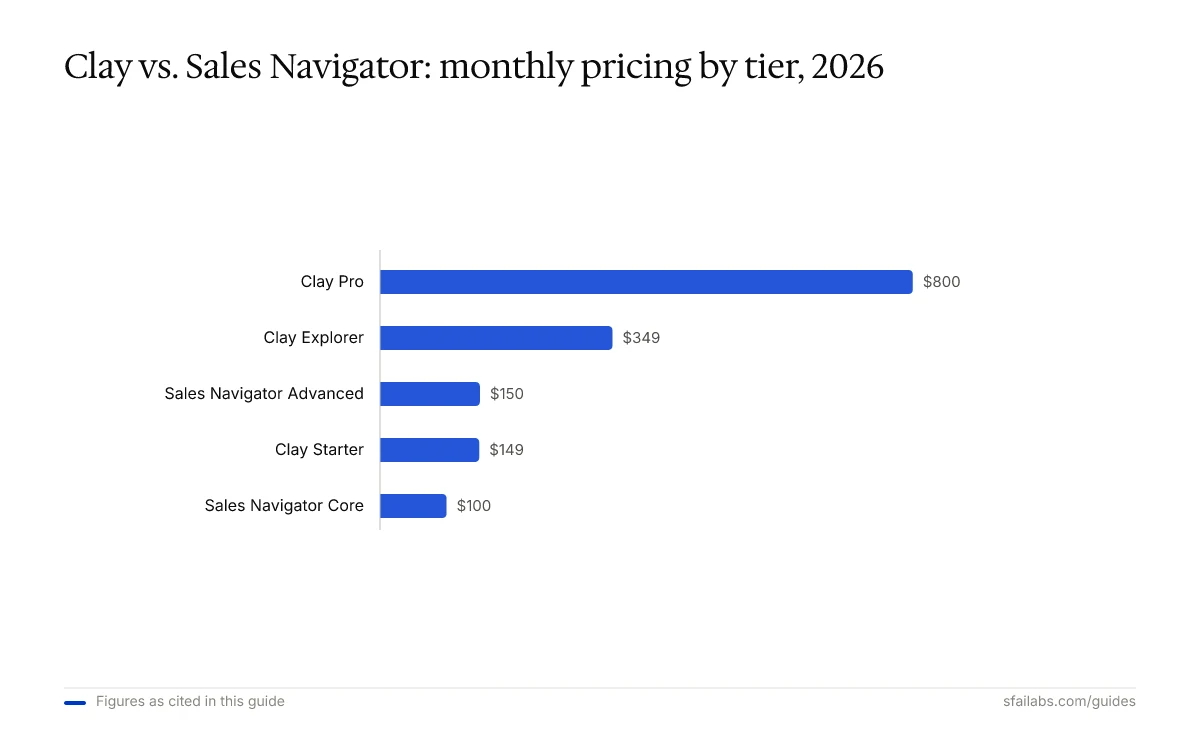
- Starter: ~$149/month with roughly 2,000 credits
- Explorer: ~$349/month with 10,000 credits
- Pro: ~$800/month with 50,000 credits
- Enterprise: Custom pricing with volume discounts
A basic email enrichment costs 2-3 credits per match. A comprehensive profile build with firmographics, technographics, and AI personalization can consume 15-25 credits per prospect. That range matters more than the sticker price of any plan.
What Sales Navigator Does Well (and Where It Falls Short)
Sales Navigator’s strength is something no third-party tool can replicate: real-time access to LinkedIn’s professional graph. When a prospect changes jobs, you know within days. When a target account posts about expansion plans, it surfaces in your feed. When you need to find the VP of Engineering at a Series B fintech in Chicago, the advanced filters get you there in seconds.
The 50 InMail credits per month on the Core plan are more valuable than they appear. LinkedIn reports that InMail messages get 3x the response rate of cold emails, partly because they carry the implicit trust of a shared professional network. And if your InMail gets a reply within 90 days, the credit comes back.
Relationship mapping on the Advanced Plus plan is genuinely useful for enterprise sales. It visualizes stakeholder relationships within target accounts and identifies warm introduction paths through your team’s combined network. For complex, multi-threaded deals, this feature alone can justify the subscription.
The limitations are equally clear. Sales Navigator does not export data. It gives you no email addresses. It provides no phone numbers. You can see a prospect’s profile, send an InMail, and save them to a list, but you cannot push that contact into an outbound sequence without a third-party tool bridging the gap. For teams that rely on email-first outreach, Sales Navigator is a research tool, not an execution tool.
Sales Navigator Pricing Breakdown
Sales Navigator uses a per-seat subscription model:
- Core: ~$80/month (annual) or ~$100/month (monthly)
- Advanced: ~$125/month (annual) or ~$150/month (monthly)
- Advanced Plus: Custom enterprise pricing, starting around $1,600/year per seat
The Core plan includes advanced search filters, 10,000 saved leads, 50 InMail credits, lead recommendations, and CRM sync with Salesforce or Dynamics. Advanced adds team features and deeper HubSpot/Salesforce integration. Advanced Plus layers on AI-assisted InMail drafts, relationship maps, and enhanced reporting.
The Real Comparison: Different Tools for Different Jobs
Framing this as Clay versus Sales Navigator misses the point. They occupy different layers of the prospecting stack. But since budgets force choices, here is how they compare on the dimensions that matter.
| Dimension | Clay | Sales Navigator |
|---|---|---|
| Primary function | Data enrichment and workflow automation | Lead discovery and relationship intelligence |
| Data sources | 50+ third-party providers | LinkedIn’s first-party network data |
| Email/phone discovery | Yes, via waterfall enrichment | No native capability |
| Contact export | Full export to CRM and sequencers | Severely restricted |
| InMail/direct messaging | No | 50 credits/month (Core) |
| Learning curve | Steep; requires ops expertise | Low; 30 minutes to functional |
| Best for | High-volume outbound (1,000+ leads/month) | Account-based selling, warm outreach |
| G2 rating | 4.9/5 | 4.3/5 |
When Clay Is the Better Pick
Choose Clay when your team runs high-volume outbound campaigns and needs enriched contact data flowing into email sequences automatically. If you are sending 1,000+ personalized emails per month and your bottleneck is finding accurate contact information across multiple channels, Clay removes that bottleneck.
Clay also wins when you need data from beyond LinkedIn. Job postings, funding rounds, technographic signals, website visitor identification. These enrichments compound when layered together in a single workflow, and no other tool stitches them together as flexibly.
When Sales Navigator Is the Better Pick
Choose Sales Navigator when your sales motion is relationship-driven and your team sells into mid-market or enterprise accounts. If your reps spend more time researching accounts and building multi-threaded relationships than they do blasting cold emails, Sales Navigator’s real-time signals and InMail capabilities deliver more value per dollar.
Sales Navigator is also the right call for smaller teams that need to start prospecting immediately without an ops resource to manage tooling. The interface is intuitive, onboarding takes less than an hour, and the lead recommendations algorithm surfaces relevant prospects without manual list-building.
When You Need Both
The most effective B2B teams we have observed run both tools in tandem. Sales Navigator handles the front end: identifying target accounts, monitoring buying signals, building relationship maps. Clay handles the back end: enriching contacts discovered in Sales Navigator with verified emails and phone numbers, then pushing them into outbound sequences.
This stack works because the tools do not overlap. Sales Navigator finds the right people. Clay gives you the data to reach them outside of LinkedIn.
What the Reviews Actually Say
Clay’s 4.9 G2 rating reflects genuine enthusiasm from power users, particularly RevOps teams and growth operators who build complex workflows. The most common praise centers on flexibility and time savings. But the negative reviews are pointed: credit costs spiral without governance, customer support gets mixed marks, and the UI can feel overwhelming for new users.
Sales Navigator’s 4.3 G2 rating is dragged down by two persistent complaints: pricing feels steep for what you get, and the interface looks dated. Users also express frustration about export restrictions, which feel increasingly out of step with how modern sales teams operate. On the positive side, users consistently highlight the quality of LinkedIn’s data and the accuracy of lead recommendations.
The gap between those ratings tells a story. Clay users tend to be technical operators who selected the tool deliberately. Sales Navigator users include everyone from enterprise AEs to solo consultants, and the broader user base naturally produces more varied feedback.
A Note on Credit Economics
After managing budgets on both platforms, the pricing models reward different behaviors.
Clay’s credit system punishes spray-and-pray. If you enrich 5,000 contacts at 15 credits each, that is 75,000 credits, well beyond the Pro plan. Mature teams set pre-qualification rules: only enrich contacts that match ICP criteria on at least three dimensions. This discipline cuts credit waste by 40-60% in our experience.
Sales Navigator’s flat subscription rewards consistent usage. Whether you search 10 times or 10,000 times in a month, the cost is identical. The constraint is InMail credits, which forces prioritization of outreach targets. That constraint is actually healthy for most teams.
FAQ
Can Clay replace LinkedIn Sales Navigator entirely?
Not for most teams. Clay excels at data enrichment and workflow automation, but it cannot replicate Sales Navigator’s real-time access to LinkedIn’s professional network. You will miss job change alerts, InMail messaging, and relationship mapping. If your outreach is 100% email-based and you never use LinkedIn for research, Clay alone could work. But that describes a shrinking number of B2B sellers.
Is Clay worth it for a small team of 2-3 SDRs?
It depends on volume. If your team sends fewer than 500 outbound emails per month, Clay’s Starter plan at $149/month may not deliver enough ROI to justify the learning curve. Sales Navigator Core at $80/month per seat gives you immediate value with less setup. Clay starts making economic sense when you are processing 1,000+ leads monthly and need automated enrichment.
How many InMail credits do you get with Sales Navigator?
The Core and Advanced plans include 50 InMail credits per month per seat. Advanced Plus includes more. A key detail that many buyers miss: if your InMail receives a response within 90 days, the credit is refunded. This means active, well-targeted InMail senders effectively get more than 50 messages per month.
Does Clay integrate with Sales Navigator?
Not natively through an official API. However, many teams use Clay to enrich contacts originally sourced from Sales Navigator searches. The typical workflow involves exporting a Sales Navigator lead list through a browser extension or third-party connector, then importing it into Clay for enrichment. Clay also integrates with LinkedIn profile URLs as an input for enrichment lookups.
What is Clay’s waterfall enrichment and why does it matter?
Waterfall enrichment queries multiple data providers in sequence for the same data point. If you are looking for a prospect’s email, Clay first checks one provider, then another, then another, until it finds a match. This approach achieves 80%+ hit rates on email discovery versus 40-50% from any single provider. The downside is that each additional provider check consumes credits, so it costs more per contact.
Which tool has better CRM integration?
Clay offers deeper workflow integration. It connects natively to HubSpot and Salesforce with the ability to create, update, and upsert records, plus push enriched data directly into CRM fields. Sales Navigator’s CRM integration is more limited, focused on syncing saved leads and logging InMail activity. If keeping your CRM data enriched and current is the priority, Clay is the stronger choice.
Can I use Sales Navigator for free?
LinkedIn offers a 30-day free trial for the Core plan. After that, there is no free tier. LinkedIn Premium (a separate, cheaper product) gives you some enhanced search but lacks Sales Navigator’s advanced filters, lead saving, InMail credits, and CRM integration. The free trial is worth using, but budget for the paid plan if prospecting is a core activity.
What are the biggest complaints about each tool?
For Clay: unpredictable credit costs, steep learning curve, and the need for a dedicated ops person to manage workflows. For Sales Navigator: high per-seat pricing, outdated UI, and restrictive data export policies. Both tools also receive criticism for customer support responsiveness, though Clay’s community and documentation have improved significantly through 2025 and into 2026.
The Bottom Line
Clay and Sales Navigator are not competitors. They are complements that happen to bill separately. Sales Navigator gives you the map. Clay gives you the tools to act on it. If your budget forces a single choice, pick the tool that matches your sales motion: Sales Navigator for relationship-driven, account-based selling; Clay for high-volume, data-intensive outbound.
The teams closing the most pipeline in 2026 are running both, with Clay automating the enrichment and sequencing that Sales Navigator’s export restrictions make impossible on their own.
SFAI Labs


